MOBAPAD M12 S/HD Gaming Controller for Nintendo Switch 2 with TMR Sticks, Mechanical Buttons Joypad for Switch2 Console

Description

SPECIFICATIONS

ABXY Switch Type: Tactile switch

Battery Included: Yes

Brand Name: MOBAPAD

Bumpers Switch Type: Tactile switch

Certification: CE

Compatible Brand/Model: Nintendo

Compatible Nintendo Model: Nintendo Switch 2

Compatible Platform: Nintendo Switch 2

D-pad Switch Type: MEMBRANE

Hall Effect: Yes

High-concerned chemical: None

Interface Type: Bluetooth

Joystick Sensor Module Brand/Type: TMR Joysticks

Model Number: M12 S/HD

Origin: Mainland China

Package: Yes

RGB lighting joysticks: Yes

Support Software configuration: Yes

Trigger Button Type: Hall-Linear

Type: Gamepads

Wear-resistant joysticks: No

MOBAPAD M12 S Controller for Switch 2

TMR Glide Sticks: Drift-free, smooth, with zero stick edge contact.

The M12 S Charging: Cannot charge while the screen is off, but it can charge with the screen off when connected to an external power source.

Wired& Wireless Connection:
Seamless switch between handheld and wireless modes.
Joycon 2 Inspired Finish: A delicate, premium matte coating that looks seamless with Nintendo Switch 2 and feels perfectly natural to the touch.

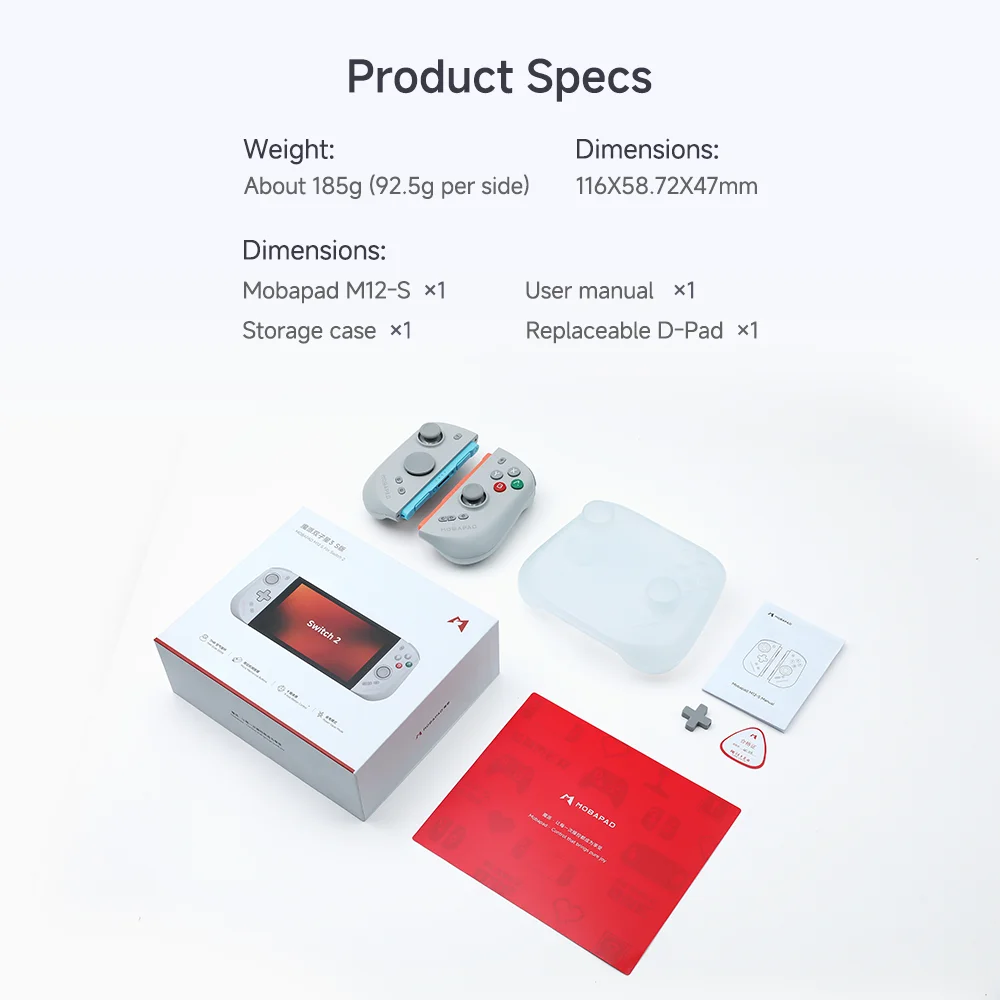
Interchangeable D-pad: Cross D-pad/disc D-pad

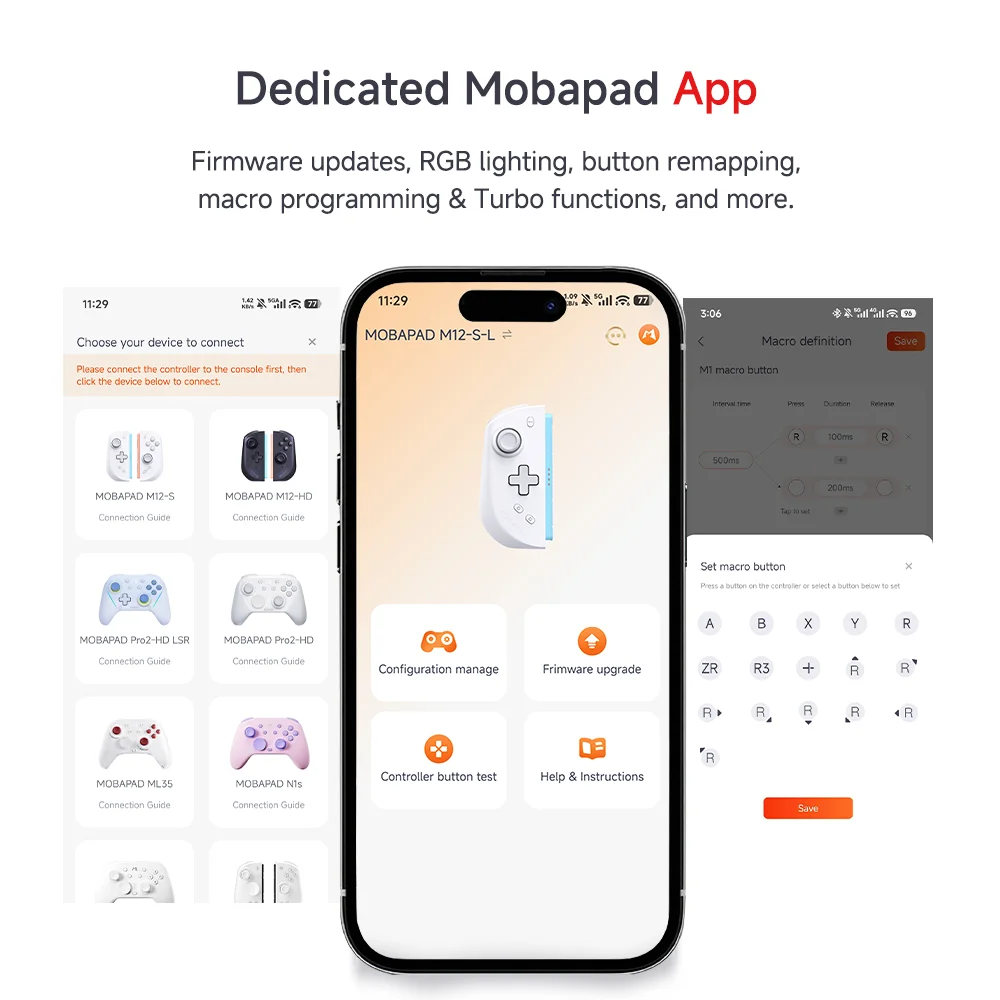
Supports Turbo, Remapping & Macros
MOBAPAD M12 HD Controller for Switch 2

1.TMR Glide Sticks: Drift-free, smooth, with zero stick edge contact.

2.Enhanced Ergonomics: Rejecting simple scaling, the M12 HD shifts the controller’s center of gravity toward the middle. At only ~92.5g per side, it delivers effortless handling and an unmatched gaming experience.

3.Power-Saver Mode: Cuts the Mobapad M12 HD Switch 2 Joycon power draw from the Nintendo Switch 2, extending console battery by up to 30 minutes.

4.The M12 HD supports these three charging methods:
- Handheld Mode: With power-saving mode turned off, the console provides power to the controllers during use.
- TV Mode: While the console is docked and active (with power-saving mode off), it provides power to the controllers.
- Charging Grip: This allows the controllers to be powered independently at any time.

FAQ

How to charge the M12 HD ?

Currently, the M12 HD supports these three charging methods:

- Handheld Mode: With power-saving mode turned off, the console provides power to the controllers during use.

- TV Mode: While the console is docked and active (with power-saving mode off), it provides power to the controllers.

- Charging Grip: This allows the controllers to be powered independently at any time.

What are the dimensions of the Mobapad M12 HD / M12S Switch2 JoyCon attached to Switch 2?

When attached to the Switch 2 console, the approximate dimensions of the Mobapad M12 HD / M12 S are:
306.87mm (L) × 116.20mm (W) × 46.93mm (H).

Does the Mobapad M12S Switch 2 JoyCon support button remapping and macro functions?

Yes, the Mobapad M12S Switch 2 JoyCon supports button remapping and allows you to set macro functions via the back buttons.

Please note: The GL and GR buttons on the M12S JoyCon cannot be used to configure the Switch2 system menu in wireless mode.

What is the connection difference between the Mobapad M12 HD and the M12S Switch2 JoyCons?

When used in wired mode, both the Mobapad M12 HD and M12S connect through a physical connection, which also handles data transmission. In wireless mode, both models use Bluetooth connection, just like the Nintendo Switch Joy-Con 2.

What upgrades does the Mobapad M12 Series Switch 2 Joy-Con offer compared to the Mobapad M6 HD?

1.Refined ergonomics for Switch 2: With the wider Switch 2 screen in mind, the Mobapad M12 HD and M12S have been ergonomically redesigned to feel more comfortable in hand and better balanced on the console—without simply making the controller larger.

2.TMR Glide Sticks upgrade: Both the Mobapad M12 HD and M12S now feature TMR Glide Sticks, delivering an exceptionally smooth, precise, and premium control experience.

Can the logo lighting be adjusted?

The logos on both the Mobapad M12 HD and M12S Switch 2 controllers are created using a laser engraving process, and both the brightness and lighting effects of the logo can be adjusted.

What is Power-saver mode?

The Mobapad M12 series features a toggle switch on the back. This Power-saver switch allows you to cut off or restore the power supply to the Switch 2.
This prevents the Switch 2 from supplying power to the controller, thereby preventing the controller from draining the console's battery. This helps to relatively extend the Switch 2's battery life.

What is the difference between the M button and the C button?

The M button is a feature on the Mobapad M12 HD version. It supports Turbo, button remapping, and macro programming.
The C button is a feature on the Mobapad M12S version. It is a dedicated voice button that enables in-game voice chat functionality.


MOBAPAD M12 S/HD Gaming Controller for Nintendo Switch 2 with TMR Sticks, Mechanical Buttons Joypad for Switch2 Console

Product form

SPECIFICATIONSABXY Switch Type: Tactile switchBattery Included: YesBrand Name: MOBAPADBumpers Switch Type: Tactile switchCertification: CECompatible Brand/Model: NintendoCompatible Nintendo Model: Nintendo Switch... Read more

Next dispatch: 1–3 business days

$207.20 Including GST

    • Guaranteed secure & safe checkout.

      shop pay
    • No hassle returns, 30 days return
    Shipping & delivery

    In-stock orders are normally dispatched within 1–3 business days. Delivery times vary by destination and carrier. Read our Shipping Policy

    Returns & refunds

    Eligible returns can be requested within 30 days of delivery. Faulty, damaged or incorrect items are handled in line with Australian Consumer Law. Read our Return & Refund Policy

    Description

    SPECIFICATIONS

    ABXY Switch Type: Tactile switch

    Battery Included: Yes

    Brand Name: MOBAPAD

    Bumpers Switch Type: Tactile switch

    Certification: CE

    Compatible Brand/Model: Nintendo

    Compatible Nintendo Model: Nintendo Switch 2

    Compatible Platform: Nintendo Switch 2

    D-pad Switch Type: MEMBRANE

    Hall Effect: Yes

    High-concerned chemical: None

    Interface Type: Bluetooth

    Joystick Sensor Module Brand/Type: TMR Joysticks

    Model Number: M12 S/HD

    Origin: Mainland China

    Package: Yes

    RGB lighting joysticks: Yes

    Support Software configuration: Yes

    Trigger Button Type: Hall-Linear

    Type: Gamepads

    Wear-resistant joysticks: No

    MOBAPAD M12 S Controller for Switch 2

    TMR Glide Sticks: Drift-free, smooth, with zero stick edge contact.

    The M12 S Charging: Cannot charge while the screen is off, but it can charge with the screen off when connected to an external power source.

    Wired& Wireless Connection:
    Seamless switch between handheld and wireless modes.
    Joycon 2 Inspired Finish: A delicate, premium matte coating that looks seamless with Nintendo Switch 2 and feels perfectly natural to the touch.

    Interchangeable D-pad: Cross D-pad/disc D-pad

    Supports Turbo, Remapping & Macros
    MOBAPAD M12 HD Controller for Switch 2

    1.TMR Glide Sticks: Drift-free, smooth, with zero stick edge contact.

    2.Enhanced Ergonomics: Rejecting simple scaling, the M12 HD shifts the controller’s center of gravity toward the middle. At only ~92.5g per side, it delivers effortless handling and an unmatched gaming experience.

    3.Power-Saver Mode: Cuts the Mobapad M12 HD Switch 2 Joycon power draw from the Nintendo Switch 2, extending console battery by up to 30 minutes.

    4.The M12 HD supports these three charging methods:
    - Handheld Mode: With power-saving mode turned off, the console provides power to the controllers during use.
    - TV Mode: While the console is docked and active (with power-saving mode off), it provides power to the controllers.
    - Charging Grip: This allows the controllers to be powered independently at any time.

    FAQ

    How to charge the M12 HD ?

    Currently, the M12 HD supports these three charging methods:

    - Handheld Mode: With power-saving mode turned off, the console provides power to the controllers during use.

    - TV Mode: While the console is docked and active (with power-saving mode off), it provides power to the controllers.

    - Charging Grip: This allows the controllers to be powered independently at any time.

    What are the dimensions of the Mobapad M12 HD / M12S Switch2 JoyCon attached to Switch 2?

    When attached to the Switch 2 console, the approximate dimensions of the Mobapad M12 HD / M12 S are:
    306.87mm (L) × 116.20mm (W) × 46.93mm (H).

    Does the Mobapad M12S Switch 2 JoyCon support button remapping and macro functions?

    Yes, the Mobapad M12S Switch 2 JoyCon supports button remapping and allows you to set macro functions via the back buttons.

    Please note: The GL and GR buttons on the M12S JoyCon cannot be used to configure the Switch2 system menu in wireless mode.

    What is the connection difference between the Mobapad M12 HD and the M12S Switch2 JoyCons?

    When used in wired mode, both the Mobapad M12 HD and M12S connect through a physical connection, which also handles data transmission. In wireless mode, both models use Bluetooth connection, just like the Nintendo Switch Joy-Con 2.

    What upgrades does the Mobapad M12 Series Switch 2 Joy-Con offer compared to the Mobapad M6 HD?

    1.Refined ergonomics for Switch 2: With the wider Switch 2 screen in mind, the Mobapad M12 HD and M12S have been ergonomically redesigned to feel more comfortable in hand and better balanced on the console—without simply making the controller larger.

    2.TMR Glide Sticks upgrade: Both the Mobapad M12 HD and M12S now feature TMR Glide Sticks, delivering an exceptionally smooth, precise, and premium control experience.

    Can the logo lighting be adjusted?

    The logos on both the Mobapad M12 HD and M12S Switch 2 controllers are created using a laser engraving process, and both the brightness and lighting effects of the logo can be adjusted.

    What is Power-saver mode?

    The Mobapad M12 series features a toggle switch on the back. This Power-saver switch allows you to cut off or restore the power supply to the Switch 2.
    This prevents the Switch 2 from supplying power to the controller, thereby preventing the controller from draining the console's battery. This helps to relatively extend the Switch 2's battery life.

    What is the difference between the M button and the C button?

    The M button is a feature on the Mobapad M12 HD version. It supports Turbo, button remapping, and macro programming.
    The C button is a feature on the Mobapad M12S version. It is a dedicated voice button that enables in-game voice chat functionality.


    Top 10 best selling products

    You may also like these products. These products are rated as 'top 10 best of the best' by our clients

    Returns & Delivery

    When will my order be dispatched?

    In-stock orders are normally dispatched within 1–3 business days. Delivery times vary by destination and carrier. Tracking details will be emailed after your order is dispatched.

    Can I return my product?

    You can request a return within 30 days of receiving your order. Items should be in their original, resalable condition unless they are faulty or damaged.

    What can I do if my item (or part of it) is damaged?

    Contact our Australian support team with your order number and photos of the damage. We will review the issue and help arrange the appropriate replacement, return or refund.

    Recently viewed products